> ## Documentation Index
> Fetch the complete documentation index at: https://developers.meet-oj.com/llms.txt
> Use this file to discover all available pages before exploring further.
# O.J. Embed
> Drop-in screens for the whole application, inside your product.
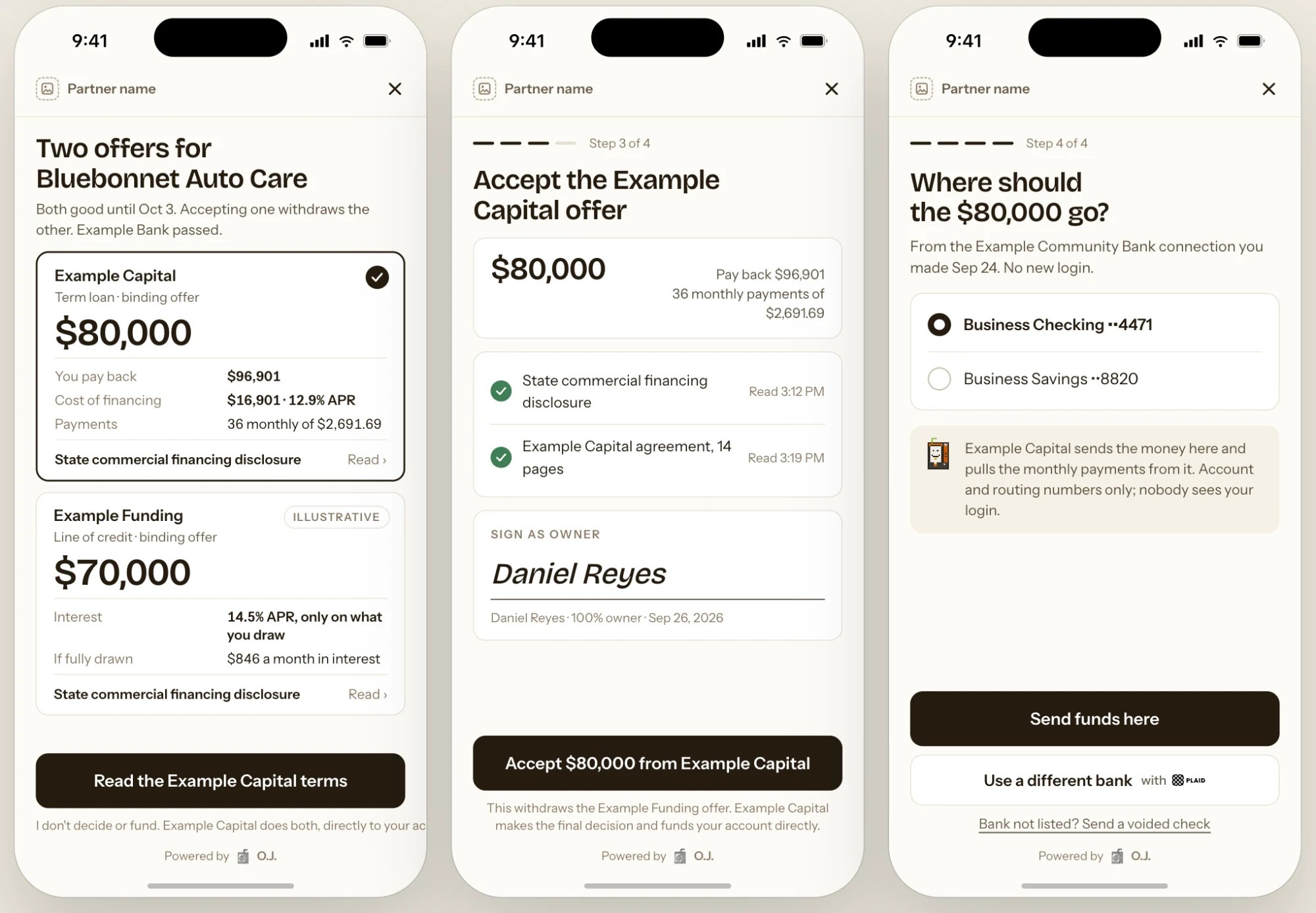
O.J. Embed puts the application inside your product, in your brand. It renders only what the API returns, so what the borrower sees in Embed matches what you'd build yourself.
Your server creates a session, your page opens the screen with its token, and borrower data goes straight to O.J., never through your servers.
## Quickstart
```javascript theme={null}
const session = await oj.partnerSessions.create({
purpose: "status",
referral_id: "ref_1MUKLA74V",
theme: { primary_color: "#1F5E8C", logo_url: "https://partner.example.com/logo.svg" },
});
res.json({ token: session.client_token });
```
```html theme={null}
```
Callbacks update your UI. [Webhooks](/webhooks) update your records.
## Components
Each component opens with a session whose `purpose` matches it.
| Component | What the borrower sees | Options |
| ------------------ | ------------------------------------------------------------------------------------------------------------------------------------------------------------------------------------------------------------------------ | -------------------------------------------- |
| `status` | Their application. When something's needed, a to-do list with one row per item in `todos`. Otherwise the five-step progress track, their matched lenders, offers and, after funding, the lender, amount and who to call. | `show_matches` `show_activity` `compact` |
| `intake` | The application, prefilled with anything you pass. Includes the credit authorization and ends with the lenders they match. | `prefill` `skip_known_fields` `product_hint` |
| `documents` | What's still needed. Connecting a bank is offered first; upload and camera capture are the alternative. | `document_request_ids` |
| `bank_connect` | Plaid, for statements or the funding account. If they already connected a bank, they pick an account without logging in again. | `purpose` `allow_fallback` |
| `offer_acceptance` | Offers side by side, the lender's disclosure, accept and sign, then the funding account. | `offer_ids` |
| `conversation` | Messages with O.J. from every channel. Borrowers can reply and attach files. | `show_history` `allow_attachments` |
Most integrations mount `status` wherever the borrower sees their account, and `intake` behind a "Get financing" button. The status card opens the other screens itself.
 ## Ways to embed
| Mode | How |
| -------------- | -------------------------------------------------------------------------------------------- |
| `modal` | `OJ.create({ token }).open()` |
| `inline` | `OJ.create({ token, container }).mount()` |
| `react` | `` from `@oj/embed-react` |
| `hosted` | Redirect to the session's `url`. The borrower returns to your `return_url` when done. |
| `iframe` | Put the session's `url` in an iframe. Callbacks arrive as JSON-RPC 2.0 `postMessage` events. |
| Web Components | `` and `` |
| `mcp-app` | Coming soon |
On mobile, open the hosted `url` in an in-app browser or a WebView.
## Callbacks
| Callback | Payload |
| ----------- | ------------------------------------------------------------------------------------------------------------------------------------------- |
| `onSuccess` | `{ referral_id, purpose, result }`. `result` is `created`, `credit_authorized`, `documents_received`, `bank_connected` or `offer_accepted`. |
| `onExit` | `{ reason, referral_id?, last_screen, error? }`. `reason` is `user_closed`, `expired` or `error`. |
| `onEvent` | `{ name, screen, referral_id?, timestamp }`, for analytics only |
If the token expires, create a new session and reopen the component. The borrower's progress is saved.
## Theme
| Key | Values |
| ---------------------- | ------------------------------------------------------------------------------------ |
| `primary_color` | Hex color |
| `logo_url` | Your logo, alone in the header. O.J. appears once, as "Powered by O.J." at the foot. |
| `partner_display_name` | How the screens refer to you |
| `radius` | `sharp` or `rounded` |
| `mode` | `light`, `dark` or `auto` |
| `locale` | `en` |
Screen copy, disclosures, consent language, the credit authorization and required fields can't be changed.
## Security
* Tokens are created on your server, are single-use, expire in 15 minutes, and are scoped to one purpose and one referral.
* Components open only on the origins listed in your policy's `allowed_origins`. `localhost` is allowed in the sandbox.
* Components render in an isolated frame. SSNs, bank logins and documents go to O.J. and Plaid; your page receives only ids and outcomes.
* O.J. reviews the page hosting the component before production access.
## Ways to embed
| Mode | How |
| -------------- | -------------------------------------------------------------------------------------------- |
| `modal` | `OJ.create({ token }).open()` |
| `inline` | `OJ.create({ token, container }).mount()` |
| `react` | `` from `@oj/embed-react` |
| `hosted` | Redirect to the session's `url`. The borrower returns to your `return_url` when done. |
| `iframe` | Put the session's `url` in an iframe. Callbacks arrive as JSON-RPC 2.0 `postMessage` events. |
| Web Components | `` and `` |
| `mcp-app` | Coming soon |
On mobile, open the hosted `url` in an in-app browser or a WebView.
## Callbacks
| Callback | Payload |
| ----------- | ------------------------------------------------------------------------------------------------------------------------------------------- |
| `onSuccess` | `{ referral_id, purpose, result }`. `result` is `created`, `credit_authorized`, `documents_received`, `bank_connected` or `offer_accepted`. |
| `onExit` | `{ reason, referral_id?, last_screen, error? }`. `reason` is `user_closed`, `expired` or `error`. |
| `onEvent` | `{ name, screen, referral_id?, timestamp }`, for analytics only |
If the token expires, create a new session and reopen the component. The borrower's progress is saved.
## Theme
| Key | Values |
| ---------------------- | ------------------------------------------------------------------------------------ |
| `primary_color` | Hex color |
| `logo_url` | Your logo, alone in the header. O.J. appears once, as "Powered by O.J." at the foot. |
| `partner_display_name` | How the screens refer to you |
| `radius` | `sharp` or `rounded` |
| `mode` | `light`, `dark` or `auto` |
| `locale` | `en` |
Screen copy, disclosures, consent language, the credit authorization and required fields can't be changed.
## Security
* Tokens are created on your server, are single-use, expire in 15 minutes, and are scoped to one purpose and one referral.
* Components open only on the origins listed in your policy's `allowed_origins`. `localhost` is allowed in the sandbox.
* Components render in an isolated frame. SSNs, bank logins and documents go to O.J. and Plaid; your page receives only ids and outcomes.
* O.J. reviews the page hosting the component before production access.